Tampilkan postingan dengan label pipo. Tampilkan semua postingan

Download latest Android KitKat 4.4.4 stock firmware for Pipo P7 Tablet


Download latest Android KitKat 4.4.4 stock firmware for Pipo P7 Tablet from here or from here. Download previous firmware from here. Download another Pipo firmware from here.

  
Firmware details
Firmware: update_P7_20150319#825
Model: Pipo P7 Tablet 
Image file size: 238 MB  
Image files: P7-PIPO_20150817-1280-800-update_#825 / update.img
Platform: RK3288
Boot version: 2.15
FW version: 4.4.02
Build number:p7HD-eng 4.4.4 KTU84Q eng.root.20150817.091232 test-keys
SDK version: RK30_ANDROID4.4.4-SDK-v1.00.00 

Caution: Please do not update firmware unless you know what you are doing, you really want it or it is absolutely necessary. Firmware updates may occasionally have bad results, like bricking your device, temporarily or permanently. The firmware update process is done entirely at your own risk. Before attempting to update the firmware, back up your data. 

Don’t miss any of our future video tutorials, follow us on Youtube. Like us on Facebook. Add us in your circles on Google+. Watch our photo albums on Flickr. Subscribe now to our newsletter. 

Photo Gallery: Pipo C2 Smart Watch


With the more and more popular smart Android Wear devices, many electronics manufacturers also devote into the development and production of wearable devices. And PIPO has also released a new smart watch, which is named as PIPO C2.

Once connected the PIPO C2 with the smartphone, you can make a phone directly with the C2. When the connection of your C2 is broken with the mobile, it will alarm to remind you. On the other hand, when you hold up the dial to answer a phone call, you can still play your mobile, such as watching videos, laying games, and chatting online with you friends, etc, which will not be affected at all, offering you the best smart experience for playing mobiles with answering phones.

Besides, PIPO C2 also has the pedometer function, which can be used to record the steps, calories, speed and mileage and other movement information. At the same time, it is also featured with the rich experience, such as taking pictures at a long distance, controlling the playing of the music, alarm clock, calendar, calculator, etc.

PIPO C2, as a smart watch, which is not only very convenient for watching time, but also support receiving phone calls at any place. It is sure to maker your intelligent life full of more fun.
 
More details about Pipo C2 smartwatch here.


Don’t miss any of our future video tutorials, follow us on Youtube. Like us on Facebook. Add us in your circles on Google+. Watch our photo albums on Flickr. Subscribe now to our newsletter.

Download Android KitKat 4.4.4 stock firmware for Pipo W6S Tablet


Download Android KitKat 4.4.4 stock firmware for Pipo W6S Tablet from here or from here. Download another Pipo firmware from here.

  
Firmware details
Firmware: W6S_3G-Android4.4.4_20150612
Model: Pipo W6S Tablet
Image file size: 440 MB  
Image: W6S_3G-Android4.4.4_20150612_[Z3735F_1920x1200_gt911
_hm2056ov5648_wifi8723BS_3G-H350]_userdebug
Platform: Intel Z3735F


Caution: Please do not update firmware unless you know what you are doing, you really want it or it is absolutely necessary. Firmware updates may occasionally have bad results, like bricking your device, temporarily or permanently. The firmware update process is done entirely at your own risk. Before attempting to update the firmware, back up your data. 

Don’t miss any of our future video tutorials, follow us on Youtube. Like us on Facebook. Add us in your circles on Google+. Watch our photo albums on Flickr. Subscribe now to our newsletter. 

Photo Gallery: Pipo Work-W6s tablet


Don’t miss any of our future video tutorials, follow us on Youtube. Like us on Facebook. Add us in your circles on Google+. Watch our photo albums on Flickr. Subscribe now to our newsletter.

Photo Gallery: Pipo X8 Mini PC


Don’t miss any of our future video tutorials, follow us on Youtube. Like us on Facebook. Add us in your circles on Google+. Watch our photo albums on Flickr. Subscribe now to our newsletter.

Download Windows Drivers for Pipo Work-W4 tablet


Download Windows Drivers for Pipo Work-W4 tablet from here, here or here. (drivers PIPO W4 - 03.07.2015 - 84 MB)


Archive content:
- wifi

- touch
- realtek bluetooth
- IWD_5.5.40.0_2014.06.17
- intel camera 2400
- hm2056
- backup
- Audio Intel
- Audio (Realtek I2S)
 

Don’t miss any of our future video tutorials, follow us on Youtube. Like us on Facebook. Add us in your circles on Google+. Watch our photo albums on Flickr. Subscribe now to our newsletter.

Video & Photo Gallery: Unboxing Pipo X8 Dual Boot Mini PC


Pipo X8 is an amazing hybrid Mini PC with its own touchscreen display
Pipo X8 Dual Boot Mini PC is a desktop or TV box that also has a built-in touchscreen. In other words, the Pipo X8 is kind of like a desktop and a tablet combined. The Pipo x8 is a sort of wedge-shaped box with four USB ports, HDMI and Ethernet jacks, a built-in speaker, and a microSD card reader. It supports 802.11n WiFi and Bluetooth 4.0. It is powered by an Intel Z3736F processor and it has 2GB of RAM and 32GB to 64GB of storage.
On top of the box is a 7 inch, 1280 x 800 pixels display with support for 5-point multitouch input. This lets you interact with the computer whether or not it’s connected to a keyboard, mouse or other external display. The system has no battery — it is designed to be plugged into a wall socket.


You can now buy Pipo X8 Dual Boot Mini PC from www.gearbest.com for only $103.90 with free shipping.


Pipo X8 Technical Specifications
- Chipset:
Z3736F Intel Baytrail quad core processor with Intel HD graphics
- RAM: 2 GB DDR3
- Storage: 32 GB internal storage + micro SD slot
- Video & Audio Output: HDMI, 3.5mm Audio
- Connectivity: 802.11 b/g/n Wi-Fi, Bluetooth 4.0, 10/100 Ethernet
- USB: 4x USB 2.0 port
- Other Features: Power button, Integrated Speakers, 1 year Office 365 subscription.
- OS: Dual-Boot: Windows 8.1 with Bing/Android 4.4
- Power Supply: 12v 2.4A

Package Content
1 x TV Box
1 x Power Adapter  
1 x Pipo Warranty Card


I'll be back soon these days with the first impression story, so stay close.


About Gearbest  
GearBest is more than just a shopping site, it's designed for gadget lovers by gadget lovers. We have a passion for all kinds of tech from retro style to the absolute cutting edge. At GearBest, our company vision is simple: to become the premier online electronics seller by providing an unparalleled selection of the very best gadgets, an unbeatable shopping experience, prompt shipping and exceptional customer service that exceeds expectations. For us, the customer is always king. Our total commitment to customers empowers us to work closely together with every customer. When you buy from us, the sale is not complete when we ship your order, it is complete when you are totally satisfied.


Don’t miss any of our future video tutorials, follow us on Youtube. Like us on Facebook. Add us in your circles on Google+. Watch our photo albums on Flickr. Subscribe now to our newsletter.

Photo Gallery: Pipo Work-W6s tablet


China Dual OS Tablet PC Flash Methods


Download China Dual OS Tablet PC Flash Methods archive from here, here or here.

Archive name:
Archive size: 21 MB

Archive content:
- Chuwi Android Flash Guide
- Chuwi Flash Note
- Chuwi Windows Flash Guide
- Cube Dual OS Flash Guide
- Onda  Win 8.1 System Flash Guide 
- Onda Android 4.4 System Flash Guide
- PIPO Dual OS Upgrade Guide
- Ramos Dual OS Flash Guide
- Teclast Dual Boot Upgrade Method
- Vido Dual OS Flash Guide


Caution: Please do not update firmware unless you know what you are doing, you really want it or it is absolutely necessary. Firmware updates may occasionally have bad results, like bricking your device, temporarily or permanently. The firmware update process is done entirely at your own risk. Before attempting to update the firmware, back up your data. 


Don’t miss any of our future video tutorials, follow us on Youtube. Like us on Facebook. Add us in your circles on Google+. Watch our photo albums on Flickr. Subscribe now to our newsletter.

Download Android KitKat 4.4.2 stock firmware for Pipo M9S Tablet


Download Android KitKat 4.4.2 stock firmware for Pipo M9S Tablet from here or from here. Download another Pipo firmware from here.

  
Firmware details
Firmware: rk3288_P9A_pipo_M9S_camera500_20141219
Model: Pipo M9S Tablet
Image file size: 231 MB  
Image files: rk3288_P9A_pipo_M9S_camera500_20141219
Platform: Rockchip RK3288
Boot version: 2.15
FW version: 4.4.02
Build number: rk3288-eng 4.4.2 KOT49H eng.root.20141219.153818 test-keys
SDK version: RK30_ANDROID4.4.2-SDK-v1.00.00

Caution: Please do not update firmware unless you know what you are doing, you really want it or it is absolutely necessary. Firmware updates may occasionally have bad results, like bricking your device, temporarily or permanently. The firmware update process is done entirely at your own risk. Before attempting to update the firmware, back up your data. 

Don’t miss any of our future video tutorials, follow us on Youtube. Like us on Facebook. Add us in your circles on Google+. Watch our photo albums on Flickr. Subscribe now to our newsletter. 

Download Pipo Work W7 tools


Download Pipo Work W7 tools from here, here or here.
Download latest BIOS upgrade file for Pipo W7 Tablet  from here.

Archive name: W7 安卓tools
Archive size: 37 MB

Archive content:
- adb
- SF6.0.4.31
- Intel android+f+▌++-+V4.0.docx
- IntelAndroidDrvSetup1.5.0
- iSocUSB-Driver-Setup-1.2.0
- ManufacturingFlashTool_Setup_6.0.43


Don’t miss any of our future video tutorials, follow us on Youtube. Like us on Facebook. Add us in your circles on Google+. Watch our photo albums on Flickr. Subscribe now to our newsletter.
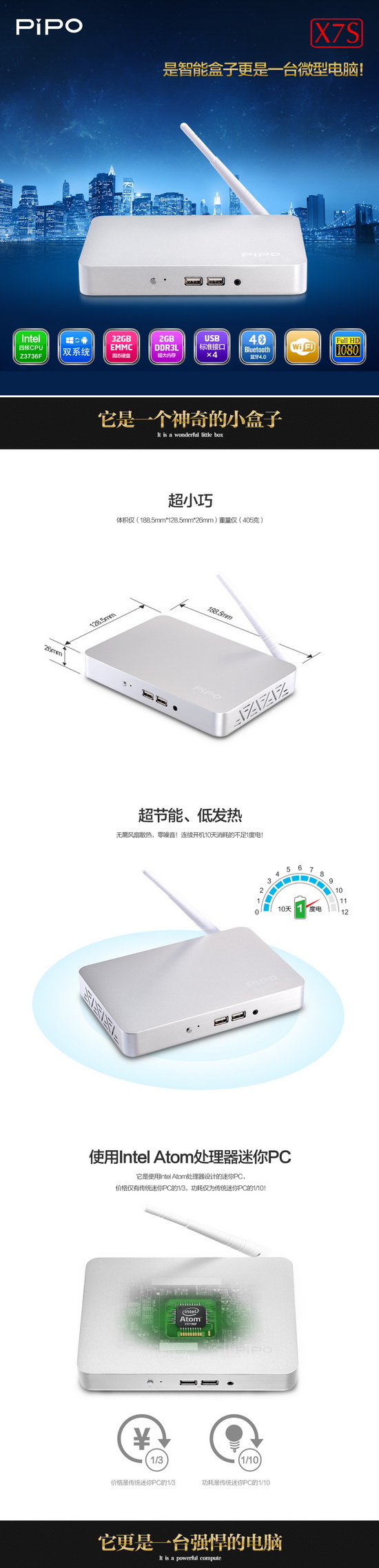
Photo Gallery: Pipo Work-W8 tablet


Photo Gallery: Pipo X7S Mini PC


Photo Gallery: Pipo Work W3 Windows 8.1 tablet


Photo Gallery: Pipo Work W4S Windows tablet

PIPO W4S is powered by the Intel Z3735F quad-core processor and 2GB RAM. But PIPO upgraded the W4S internal storage to 64GB, which is twice as much space as found in most other Chinese rivals, and guarantees more storage for applications and media files. Also, the eMMc storage has a much faster reading and writing speed than average flash disk. The slate also features an 8-inch IPS display at the resolution of 1280*800 (16:10), a 4,500mAh Li-Po battery as well as dual cameras (2MP front / 5MP rear).

Photo Gallery: Pipo Work W4 Windows tablet


Pipo Work W4 features an 8 inch, 1280 x 800 pxiel IPS display, 1GB of RAM, and 16GB of storage. It’s powered by an Intel Atom Z3735F quad-core Bay Trail processor. The tablet supports WiFi and Bluetooth, has a 2MP rear camera, a 0.3MP front camera, and a 4500mAh battery.

Download latest Android KitKat 4.4.4 stock firmware for Pipo P7 Tablet


Download latest Android KitKat 4.4.4 stock firmware for Pipo P7 Tablet from here or from here. Download previous firmware from here. Download another Pipo firmware from here.

  
Firmware details
Firmware: update_P7_20150319#825
Model: Pipo P7 Tablet 
Image file size: 217 MB  
Image files: update_P7_20150319#825
Platform: RK3288
Boot version: 2.15
FW version: 4.4.02
Build number: p7HD-eng 4.4.4 KTU84Q eng.root.20150319.091232 test-keys
SDK version: RK30_ANDROID4.4.4-SDK-v1.00.00 

Caution: Please do not update firmware unless you know what you are doing, you really want it or it is absolutely necessary. Firmware updates may occasionally have bad results, like bricking your device, temporarily or permanently. The firmware update process is done entirely at your own risk. Before attempting to update the firmware, back up your data. 

Don’t miss any of our future video tutorials, follow us on Youtube. Like us on Facebook. Add us in your circles on Google+. Watch our photo albums on Flickr. Subscribe now to our newsletter. 

Download latest KitKat 4.4.2 stock firmware for Pipo Max M9S tablet


Download latest KitKat 4.4.2 stock firmware for Pipo Max M9S tablet from here or here. Download another Pipo firmware from here.


Firmware details
Archive: update_M9S_20141219_#223
Image: rk3288_P9A_pipo_M9S_camera500_20141219.img
Model: Pipo Max M9S tablet
Image file size: 231 MB
Platform: Rikomagic RK3288
Build number: rk3288-eng 4.4.2 KOT49H eng.root.20141219.153818 test-keys


Caution: Please do not update firmware unless you know what you are doing, you really want it or it is absolutely necessary. Firmware updates may occasionally have bad results, like bricking your device, temporarily or permanently. The firmware update process is done entirely at your own risk. Before attempting to update the firmware, back up your data. 

Don’t miss any of our future video tutorials, follow us on Youtube. Like us on Facebook. Add us in your circles on Google+. Watch our photo albums on Flickr. Subscribe now to our newsletter.

PIPO C2 Smart Watch Photos


With the more and more popular smart Android Wear devices, many electronics manufacturers also devote into the development and production of wearable devices. And PIPO has also released a new smart watch, which is named as PIPO C2. The PIPO C2 price is 199 yuan, and it is featured with a fashion appearance, separation design, back reciver. It can not only show the basic time, but also can be used as the mobile phone, such as making phone calls, check the messages and listening to music.

The separation design is very special, which means you can separate the dial with the strap. When there is a phone call, you can directly answer it without sliding or pressing any button by just hold up the dial, which is both fashionable and practical, and will protect your privacy.

The beautiful and fashionable appearance with the PIPO C2 is very appealing and will make you full of fashion temperament when dressing on it. On the dial, there is receiver, charging port, the volume button, return key, function key, and so on. And the function key plays the role of switching on/off, switching and confirming with the receiver/speaker, as well as the locking screen with the main interface. It has a clear screen display and very convenient with the viewing time.

Once connected the PIPO C2 with the smartphone, you can make a phone directly with the C2. When the connection of your C2 is broken with the mobile, it will alarm to remind you. On the other hand, when you hold up the dial to answer a phone call, you can still play your mobile, such as watching videos, laying games, and chatting online with you friends, etc, which will not be affected at all, offering you the best smart experience for playing mobiles with answering phones.

Besides, PIPO C2 also has the pedometer function, which can be used to record the steps, calories, speed and mileage and other movement information. At the same time, it is also featured with the rich experience, such as taking pictures at a long distance, controlling the playing of the music, alarm clock, calendar, calculator, etc.

PIPO C2, as a smart watch, which is not only very convenient for watching time, but also support receiving phone calls at any place. It is sure to maker your intelligent life full of more fun.


Download latest Android KitKat 4.4.2 stock firmware for Pipo W6 tablet


Download latest Android KitKat 4.4.2 stock firmware for Pipo W6 tablet from here or from here. Download previous firmware from here.

 
Firmware details
Archive: W6_Android
Model: Pipo W6 tablet
Image file size: 352 MB 
Platform: Intel Atom Z3735F


Archive content:
 
- Android_Flash 
- Image
- W6-å®‰å“ę”¹äøŗwin8_3Gē‰ˆbios - PA03V20W3_W6_10C_2.fd
- W6-å®‰å“ę”¹äøŗwin8_wifiē‰ˆbios - PA03V20W3_W6_WIFI_10F.fd 
- Androidäø‹åˆ·BIOS方法.pdf 
- MFTę“ä½œę‰‹å†Œ.pdf
- install.log 
- IntelAndroidDrvSetup1.5.0.exe
- iSocUSB-Driver-Setup-1.2.0.exe
- ManufacturingFlashTool_Setup_6.0.43.exe
 - reghackforusbdriver.reg 
- W6å®‰å“ē‰ˆęœ¬ēš„ēƒ§å½•ę–¹ę³•.pdf 
- W6ē³»ē»Ÿå®‰č£…ę“ä½œęŒ‡åÆ¼.doc


Caution: Please do not update firmware unless you know what you are doing, you really want it or it is absolutely necessary. Firmware updates may occasionally have bad results, like bricking your device, temporarily or permanently. The firmware update process is done entirely at your own risk. Before attempting to update the firmware, back up your data.


Don’t miss any of our future video tutorials, follow us on Youtube. Like us on Facebook. Add us in your circles on Google+. Watch our photo albums on Flickr. Subscribe now to our newsletter.